


GPS Navigation: Live Earth Map
4.0142.00 Reviews
App Specs
- Version
- 2.1.0
- Updated On
- License
- Free
- Downloads
- 10,000,000+
- Developer
- Prometheus Interactive LLC
- Categories
- Travel & Local
- Platform
- Android
Screenshots


 Analysis by AppCompare
I see GPS Navigation: Live Earth Map as a useful extra guide rather than a navigation app I’d trust blindly for every trip. Its appeal is the mix of route guidance, traffic, voice directions and offline maps, which can cover very different travel situations in one place. I’d consider it when I want a straightforward way to get around, but I’d still prepare for an unfamiliar journey instead of assuming any map app will handle every surprise.
Where it earns a place on my phone
The most practical strength is having connected and offline navigation in the same app. When I have a reliable connection, live traffic can help me reconsider a route; when coverage drops, saved maps can still be useful for following roads in an area I’ve prepared for. That combination is especially handy on a road trip, where mobile service can vary between towns and open stretches of road.
There’s a useful planning habit here: before leaving a reliable connection, I’d check that the relevant offline map is ready and cover the whole area I expect to cross, not just the starting point. I’d also look over the route while stationary. Offline maps are a fallback, not a reason to assume every online feature will keep working without a connection, and planning ahead is more dependable than discovering a gap after the signal disappears.
Voice directions have a different kind of value. In familiar neighborhoods, I may only need occasional prompts; in a busy interchange or an unfamiliar city, spoken guidance can reduce the temptation to glance repeatedly at the screen. I’d set the route before moving, place the phone securely, and treat the voice as assistance rather than a substitute for watching the road and signs. That is a small workflow change, but it makes navigation feel less distracting.
Useful for more than a long drive
For an everyday errand, I can see the app helping when I’m visiting a part of town I don’t know well. I’d enter the destination before setting off, check the proposed route, and use the traffic information as context if roads look busy. If I’m meeting someone at an unfamiliar address, the map view can help me understand the surrounding streets before I arrive, rather than leaving all the orientation until the final turn.
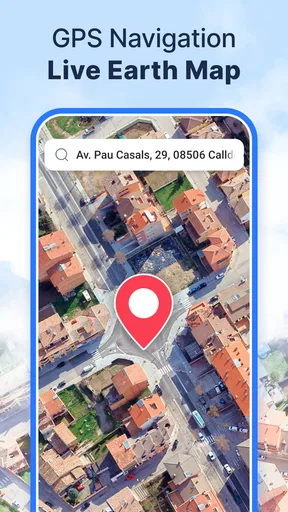
The Street View and 3D map options are best treated as preparation tools, not guarantees about what I’ll see on arrival. A virtual look at nearby streets may make a destination feel less abstract, while a 3D view can make terrain easier to interpret than a flat display. For a complicated final approach, I’d still compare the map with road signs and the actual layout; a visual preview can orient me, but it cannot replace attention to changing conditions.
That distinction matters for travelers who expect the words “live earth map” to mean a continuously updated, real-world camera view. I would approach the visual features as ways to inspect and understand places within a map app, not as a live feed of every street. If a person mainly wants detailed imagery or a specific kind of street-level coverage, checking whether the places they care about are represented should be part of deciding whether this is the right tool.
Worth Reading Before You Choose

Flipboard Shows What News Apps Must Do Beyond the Feed

Switching to Android Auto Means Rethinking Your Driving Routine

Google Calendar Makes a Crowded Week Easier to Manage

Ludo King Makes the Most of the Minutes Between Plans

Baby Panda World Brings Quick Play to Modern Phones, but Its Game Library Feels Busy

ESPN’s Live Game View Makes Following Close Games Easier
How it compares with familiar navigation choices
Compared with a basic map used only to look up an address, this app is more travel-focused: it brings route guidance, voice navigation, traffic and offline maps into the same experience. That makes it more appealing for someone who expects to move between destinations than for someone who only wants to browse a map at home. The trade-off is that having several functions does not automatically make it the best fit for every navigation habit.
If I already rely on another map app that fits my routine, I wouldn’t switch solely because this one has a 3D view or voice directions. I’d compare the experience on the roads and places I actually use, especially how well I can follow a route and whether offline preparation suits my trips. For a person who values a familiar interface and established personal routines, staying with an existing option may be easier; for someone looking for a separate travel tool with offline mapping, this app is worth testing.
It is also sensible to keep expectations modest about traffic. Live information can help when conditions change, but I wouldn’t treat any suggested reroute as automatically faster or safer. A detour through unfamiliar streets may be less useful than remaining on a clear main road, and local signs and restrictions should always take priority over a screen. The app can inform a decision; the driver still has to make it.
Who should try it—and who may prefer something else
I’d recommend it to people who drive in unfamiliar areas, take occasional road trips, or want offline maps available as a backup. It may also suit someone who likes to inspect a destination before setting out and appreciates spoken instructions. The practical benefit is strongest when the user is willing to prepare a map in advance and check the route before moving, rather than expecting the app to remove every bit of uncertainty from travel.
I’d be more cautious if I needed a highly specialized tool for a particular kind of journey, or if I depended on a navigation feature that I had not tested in the places I travel. It may not be the right choice for someone who wants only a simple address lookup and has no use for traffic, voice guidance or offline maps. Likewise, anyone navigating should avoid interacting with the phone while driving; route choices and settings belong in the planning stage or when safely stopped.
GPS Navigation: Live Earth Map is a free travel and local app from Prometheus Interactive LLC. It has a 4.4 average from around 8,400 ratings, and has been installed over five million times. It is rated for everyone, runs on Android 7.0 and later, and its current version is 2.1.0. Optional in-app purchases range from $0.99 to $99.99 per item, so I’d check what is offered in the app before buying anything rather than assuming every option is included with the free download.
One realistic way I’d use it is for a weekend drive to a town I don’t know: while still at home, I’d inspect the destination and nearby streets, prepare the offline map for the area, then start voice guidance before pulling away. If traffic changes on the way, I’d review the suggested route only when safely stopped. That routine makes good use of the app’s varied tools without relying on an internet connection or a reroute to solve everything.
Released on Oct 30, 2017, it has a clear, practical purpose, but a long-running navigation app still needs to be judged by how it works for your own routes. I’d try it on a familiar drive first, then test offline preparation before depending on it somewhere remote. That gives you a low-stakes way to learn its controls and decide whether its map style suits you.
Ever found yourself in the middle of nowhere with no clue which way to head? Trust me, I’ve been there. That’s when I stumbled upon GPS Navigation: Live Earth Map. Let’s dive into what makes this app a potential lifesaver and why it might just become your new best travel buddy.
First Impressions and Usability
As soon as you fire up GPS Navigation: Live Earth Map, you’re welcomed with a sleek and user-friendly interface. The design is intuitive, making it easy for anyone to navigate, even if you’re not particularly tech-savvy. The app isn’t cluttered with unnecessary features; everything is right where you’d expect it to be.
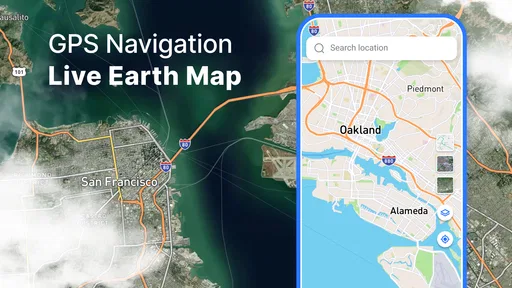
The real-time navigation is a standout feature. It’s not just about getting from point A to point B; it’s about doing it efficiently and in style. The maps are incredibly detailed, and the live updates ensure you’re always on the best route possible. Plus, it’s like having a little bit of the world in your pocket, thanks to the live earth map feature.
Features That Make a Difference
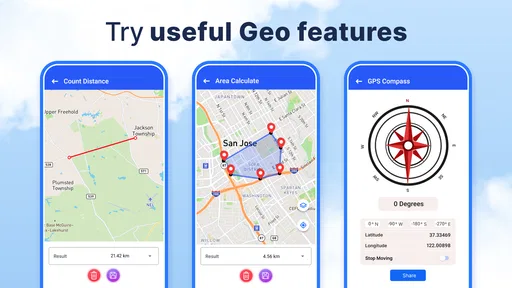
The app comes packed with a bunch of features that make it more than just a navigation tool. Here are some highlights:
- 3D Maps: These aren’t your average flat maps. The 3D view gives you a realistic feel of the terrain, which is super helpful when you’re exploring new places.
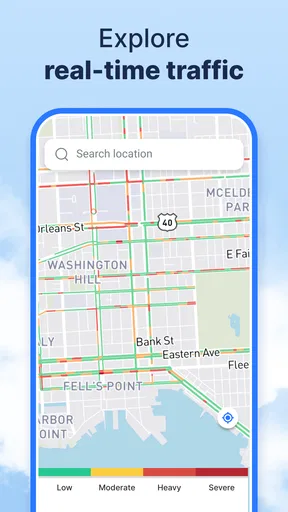
- Live Traffic Updates: Avoid the hassle of getting stuck in traffic jams with real-time updates that help you reroute on the go.
- Street View: A fantastic feature that lets you virtually walk the streets before you even get there. It’s like previewing your journey before you hit the road.
What’s more, the app supports voice navigation, so you can keep your eyes on the road and your hands on the wheel. It’s like having a personal co-pilot guiding you through every twist and turn.
Performance and Reliability
One of the most impressive things about this app is how smoothly it runs. There’s no lagging, which is crucial when you’re relying on it for directions. The developers have done a great job of ensuring the app is stable and reliable, even in areas with spotty internet connections.
The offline maps feature is a godsend for those times when you’re off the grid. You can download maps for entire regions and use them without an internet connection, which is perfect for international travelers or road trippers heading into remote areas.
Why You Should Give It a Go
If you’re looking for a navigation app that does more than just point you in the right direction, GPS Navigation: Live Earth Map is worth checking out. Whether you’re a frequent traveler, an adventurous road tripper, or just someone who likes to explore, this app has something for everyone.
To wrap it up, this app brings navigation to life with its interactive features and real-time updates. It’s not just about getting there; it’s about exploring the journey along the way. So go ahead, give it a spin and let it guide you on your next adventure! And hey, safe travels!
Pros
- Highly accurate real-time location tracking.
- User-friendly interface with intuitive design.
- Offline map access for remote areas.
- Detailed 3D maps enhance navigation experience.
- Customizable route options for efficiency.
Cons
- Consumes significant battery life quickly.
- Ads can be intrusive during usage.
- Limited features in free version.
- Occasional map data inaccuracies.
- Requires strong internet for live updates.
FAQs for GPS Navigation: Live Earth Map
Is GPS Navigation: Live Earth Map free to use?
Yes, GPS Navigation: Live Earth Map offers a free version with basic features, allowing users to access maps and navigation tools without any charge. However, there may be in-app purchases available for premium features, such as offline maps or ad-free experiences. Be sure to check the app store listing for specific pricing details.
How accurate are the maps and navigation features?
The app utilizes real-time data from trusted sources to ensure the maps and navigation features are as accurate as possible. However, users should keep in mind that traffic conditions, road closures, and other unforeseen factors may affect accuracy. Regular updates help maintain the reliability of the information provided.
Can I use the app offline?
GPS Navigation: Live Earth Map offers an offline mode, allowing users to download maps and access navigation features without an internet connection. This is particularly useful for areas with poor network coverage. However, offline mode may require a one-time purchase or subscription, so users should review these options before traveling.
What devices are compatible with GPS Navigation: Live Earth Map?
The app is compatible with most Android and iOS devices. Users should ensure their device meets the minimum operating system requirements, typically Android 5.0 or iOS 10.0 or later. Compatibility may vary with different device models, so checking the app store listing for specific device requirements is recommended.
Does the app provide real-time traffic updates?
Yes, one of the key features of GPS Navigation: Live Earth Map is its real-time traffic updates. The app provides live traffic information, allowing users to avoid congestion and find the fastest routes. This feature relies on an active internet connection, so ensure your device is connected for the best experience.


